
Compare sold and current counts
See the provider reported sold to current ratio when comparable counts are available.
Sell through rate app for comparing sold and current listing counts. Research an item, review its ratio, and inspect the matching listings.
Start with 10 free scans
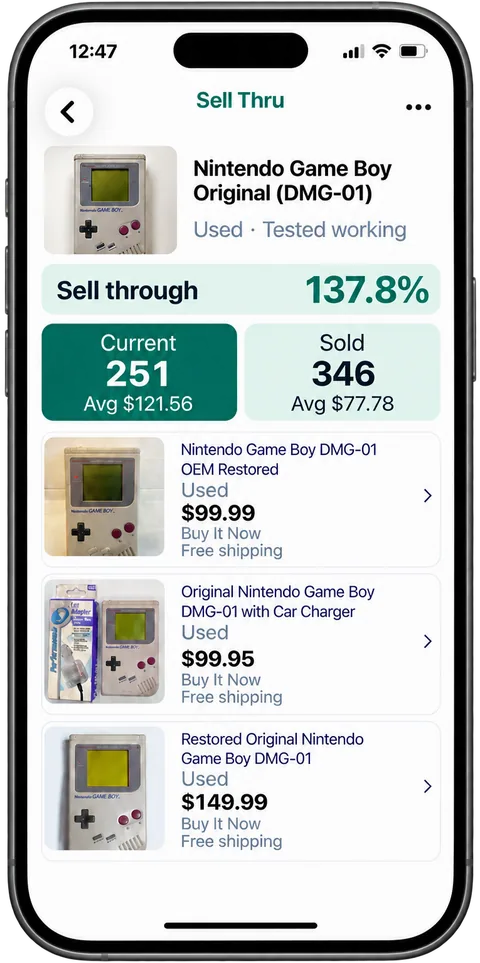
See the provider reported sold to current ratio when comparable counts are available.
Review listing photos, conditions, prices, and shipping. A useful comparison starts with a matching item.
Save your Find and return to its research while you decide what to do next.
Scan a barcode, take a photo, or search by name.
Review matching Current and Sold results and available metrics.
Inspect the listings and save the items you want to remember.
Sold listings ÷ current listings × 100. For example, 30 sold and 40 current listings give 75%; missing or incompatible counts are not treated as zero.
Yes. This sold to current ratio can exceed 100% when the sold count is higher than the current count. It is not a prediction or probability that your item will sell.
Counts can cover different products, editions, or conditions. Review the matching listings and filters instead of making a buying decision from the ratio alone.
Sell-through needs comparable sold and current counts, with at least one current listing. Missing or incompatible counts show no percentage rather than a misleading zero.
No. Sell-through uses the Current and Sold totals. History is a separate view of available older sales, with its own price chart and typical sold price range.
Start with 10 free scans. No payment required. Subscription plans are available in the app.